
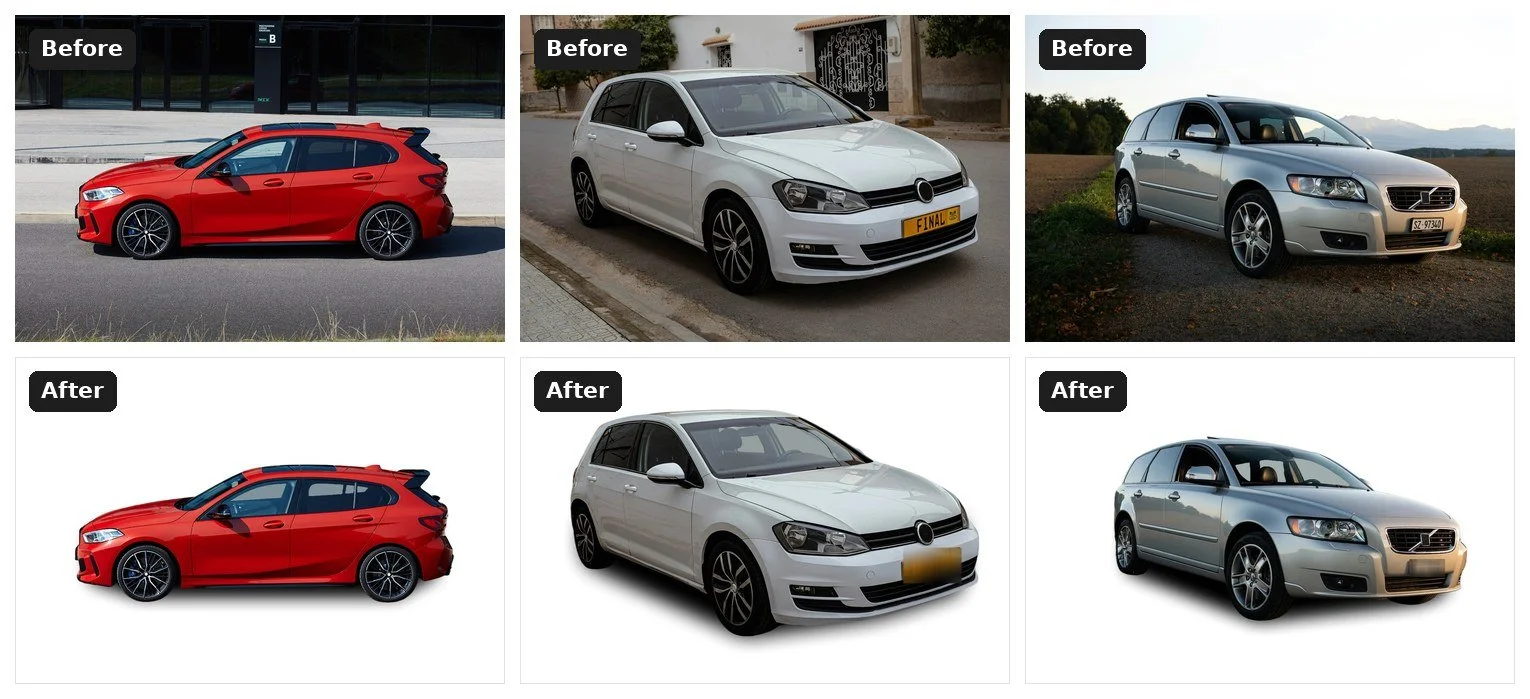
A row of listings tells a buyer a lot before they open a single one. When one car stands in front of a glass building, the next on a side street and the third on a farm track at sunset, the inventory looks like it came from three different places. Put every car on the same white background and the row reads as one dealership, and the eye goes to the cars.
This guide is for dealers who want their own lot photos on white, at volume, without a studio or an image editor. Looking for a picture of a car on white? Any photo of your own car can become one: upload it to CarBG and pick white.
Why dealers put cars on a white background
Every listing matches. Whoever took the photo, and whatever the weather was doing, the car ends up on the same backdrop.
The car is what buyers look at. No neighbors' houses, other cars or trash cans behind it, and small thumbnails stay easy to read.
No studio needed. You keep shooting where the cars already are; the background is replaced afterward.
Shoot photos that cut out cleanly
Background removal starts with the photo. A few habits make the results more even:
Get the whole car in the frame, with some space around it. Bumpers, mirrors and wheels cut off at the edge stay cut off.
Keep other cars and people clear of the outline. Anything that overlaps the car can confuse where the car ends.
Use the same set of angles for every car, for example front three-quarter, side and rear three-quarter, so the rows line up.
Shoot in even light where you can. Hard shadows across the car are the hardest case for automatic background removal, ours included.
Shoot white and silver cars against something darker where you can, such as the street side rather than a white wall.
Interiors stay as they are. Background removal is for exterior shots; interior photos go into the listing unchanged.
Put a whole lot on white in the browser with CarBG
CarBG is our browser app for car photos. There's nothing to install and no code:
Upload the day's photos. Multi-select them, or drop a zip straight off the camera card. JPG and PNG.
Pick white as the backdrop. The same choice applies to the whole batch. Transparent, your brand color or your own backdrop image are there too.
Choose the extras. A drop shadow puts the car on the ground instead of floating on white. Plate blur blurs the license plates across the whole batch.
Check the cost, then run it. Before anything runs, you see the total and what your balance will be afterward. The results come back as one zip.
Windows come back semi-transparent, so the new background shows through the glass instead of a piece of the old street.
It costs $0.03 a processed photo, paid from a prepaid balance: no subscription, no monthly minimum, and the credit doesn't expire. Photos that fail to process are not charged. A new account starts with $5 of free credit, about 166 photos, with no card.
White car on a white background
A white car on a white background is the hardest case: where the paint meets the backdrop, the edge can fade. Two settings help:
Switch on the drop shadow. The shadow under the car gives it a ground line and separates it from the white.
Use a very light gray instead of pure white. Set it as your brand color; it keeps the clean look and gives light paint a little contrast.
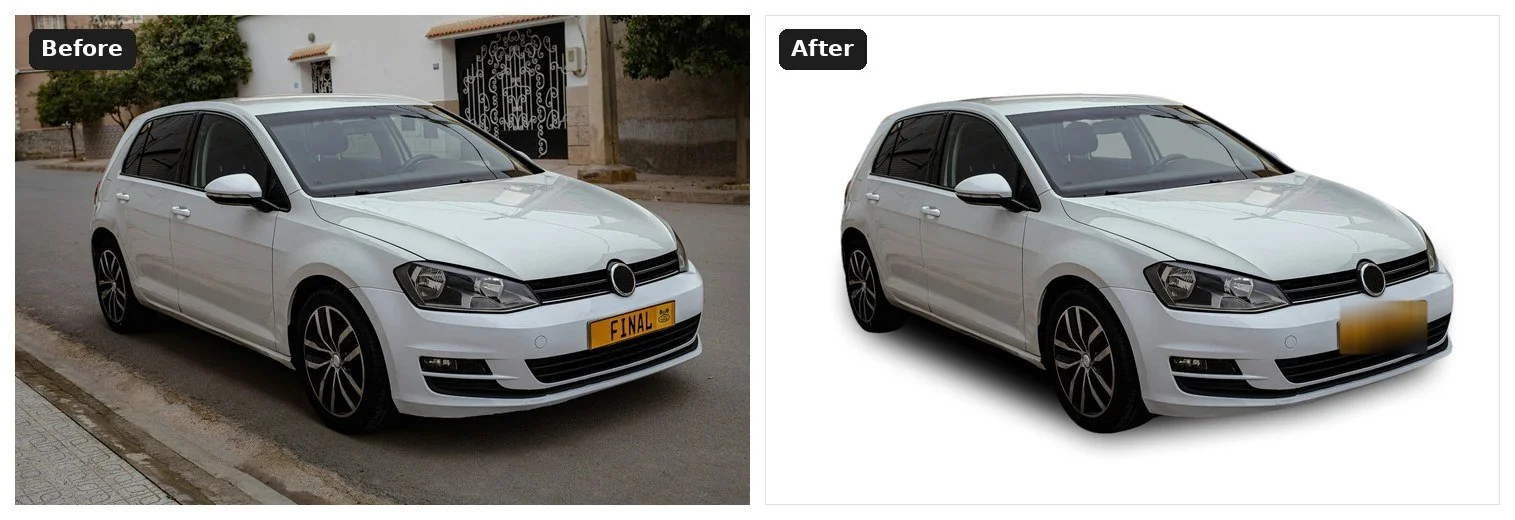
Like any automatic background removal, ours included, an occasional photo can come out with artifacts, so a quick visual check before photos go live is worth keeping. And check each listing site's photo rules before replacing backgrounds.
For listing platforms and DMS: the same result through the API
If your photos already pass through a system, such as a DMS, a listing feed or a marketplace upload, the engine behind CarBG is also a plain HTTP API, the Car Background Removal API. One call returns the car on white with a ground shadow (the example needs jq):
curl -sS -X POST \
  "https://api4ai.cloud/img-bg-removal/v1/cars/results?mode=fg-image-shadow&color=ffffff" \
  -H "X-API-KEY: YOUR_API_KEY" \
  -F "image=@car.jpg" \
  | jq -r '.results[0].entities[0].image' | base64 --decode > car-on-white.png
If the file comes out empty, run the command without the | jq … part to see the error.
color takes any color as RRGGBB, so a light gray works the same way.
mode=fg-image-shadow-hideclp adds license plate blur in the same call; mode=fg-image without color returns the car on a transparent background.
The price is the same, $0.03 a photo, from the same balance as CarBG. Volume pricing is available on request.
Get a key on the API4AI developer portal; new accounts start with $5 of free credit.
FAQ
How do I put a car on a white background without Photoshop?
Upload the photos to CarBG, pick white as the backdrop and download the zip. No editing skills or software are needed.
Can I hide the license plates at the same time?
Yes. Switch on plate blur in CarBG, or use mode=fg-image-shadow-hideclp in the API.
How much does it cost?
$0.03 a processed photo, prepaid, with no subscription. A new account gets $5 of free credit, about 166 photos.
Try it on your own lot photos
Upload a few of today's shots to CarBG and see them on white. Your $5 of free credit covers about 166 photos.