
A salesperson walks the lot with a phone. Twelve cars, twelve different backgrounds: the service bay, a competitor's banner, half a customer's minivan, the tarmac after rain. Every photo is fine on its own. Together, on a listing page, they look like twelve different dealerships.
Standardizing them by hand is the part nobody wants. An editor takes a few minutes per photo, needs someone who knows the software, and has to happen again tomorrow, because tomorrow there are fourteen more cars.
This is a walkthrough of the other way: same backdrop for every vehicle, in bulk, with no Photoshop and no editing skills. First the browser route for one person with a folder of photos, then the API route for a dealer group that wants it to happen automatically.
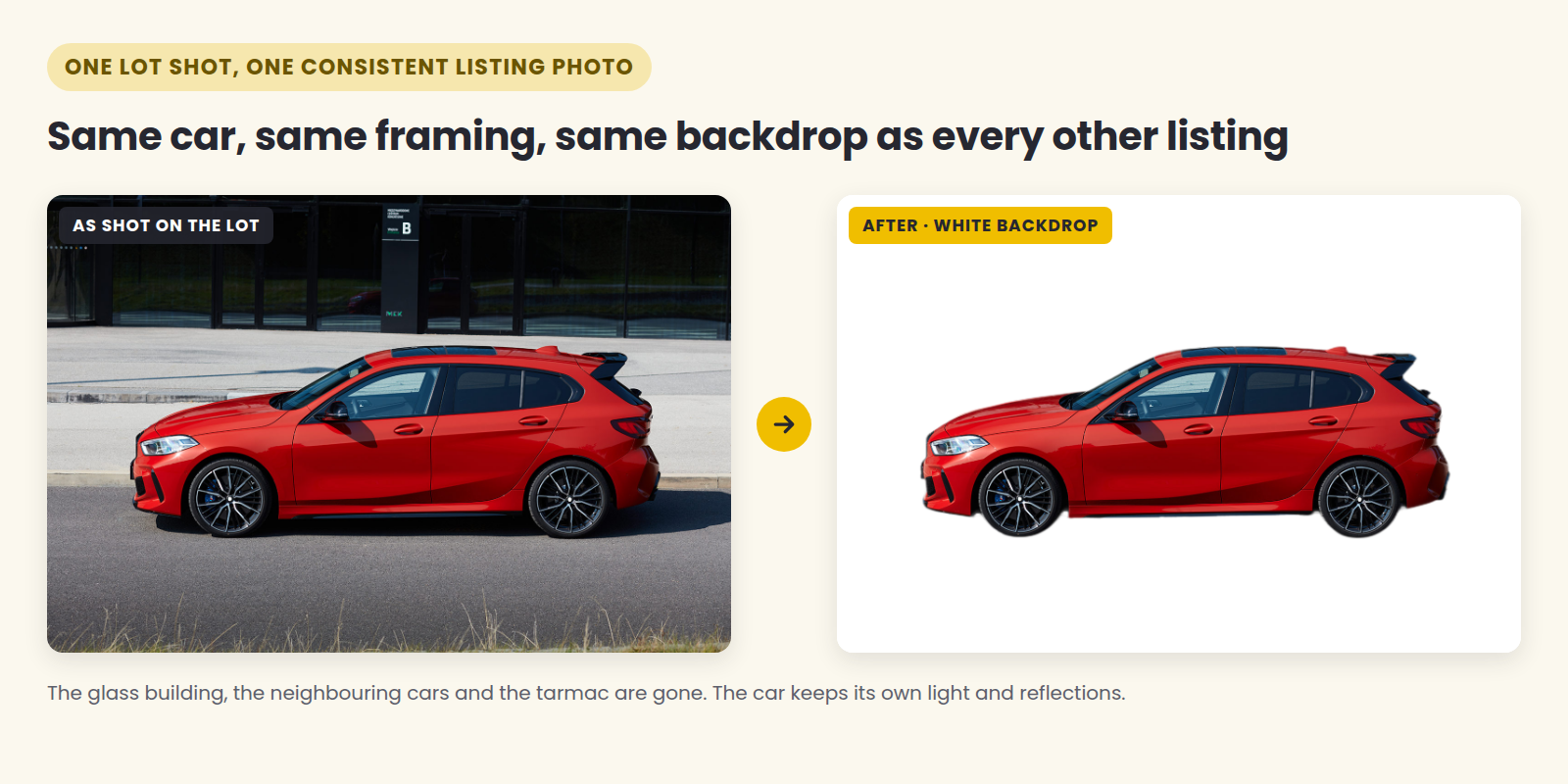
What "standardized" actually means
Four things, in order of how much they matter to a shopper scrolling a results page:
The same backdrop on every car. White, light grey, or your brand color. This is what makes a row of thumbnails read as one inventory rather than twelve snapshots.
The same framing. The whole vehicle in frame, roughly the same size in each shot, same angle for the primary photo.
No distractions. Other cars, price boards, people, your competitor's signage.
A consistent file. Same aspect ratio and resolution, so nothing gets cropped oddly by whichever marketplace you feed.
Points 2 and 4 are camera and export discipline. Points 1 and 3 are what background removal solves.
The rules your photos have to satisfy
If your inventory goes to Google's vehicle ads, the image guidelines are specific, and worth reading before you edit anything:
At least 500 × 500 px, with 1500 × 1500 or above recommended, in a 4:3 aspect ratio, up to 16 MB and 64 megapixels.
No overlaid watermarks. No superimposed logos or text. That includes the "SALE" badge and the dealership logo in the corner.
No placeholder images — no stock photo standing in for the actual car, no "Coming Soon" card. (Stock images are allowed for new vehicles if make, model and color match.)
Show the entire vehicle, with minimal staging. A front-to-side angle of about 45 degrees is recommended for the primary image; rear angles are discouraged there.
Three things are allowed but hurt performance: dealership branding in the background, modified license plates, and cluttered backgrounds.
That last line is the useful one. A clean backdrop is not just cosmetic — Google explicitly lists cluttered backgrounds among the things that reduce performance.
Option 1: the browser, for one person and a lot of cars
This is the route that needs no developer and no install. CarBG is a web tool built on API4AI's car background removal model:
Upload the day's shots. Multi-select up to 60 photos, or drop a .zip straight off the camera card. Limits are 20 MB per photo and 100 MB per zip, JPG or PNG.
Pick the output. Transparent, white, your brand color, or your own backdrop image. Optional extras: drop shadow, license-plate blur, greyscale mask.
Download one zip with every result in it.
No editing skills are involved — you are choosing a backdrop, not retouching a car. Photos that fail to process are not charged, originals are discarded rather than used for training, and results stay available for download for one month after the job runs.
The honest limitation: this is a cut-out, not a studio. It removes what is behind the car and keeps the car exactly as photographed, including the reflections of the lot in the paintwork. Shoot with that in mind — even light, whole car in frame, no one standing in the shot — and the output is listing-ready. Shoot into the sun with half the car cropped and no tool will save it.
A word about license plates
Plate blur is a switch, and whether to use it depends on where the photo is going:
Your own site, social posts, and marketplaces where you'd rather not publish a plate: blur it. Every plate in the batch gets covered in one pass, and nothing else in the frame is touched.
Google vehicle ads: modified license plates are on Google's "allowed but discouraged" list. For that feed, keep an unmodified set.
Running the batch twice — once with plate blur on, once off — costs cents, and saves you from choosing between privacy and feed performance.
Option 2: wire it into your feed with the API
If cars flow into a DMS or an inventory feed, nobody should be uploading zips by hand. The same engine is a REST endpoint:
POST https://api4ai.cloud/img-bg-removal/v1/cars/results?mode=<mode>You send the photo as multipart form data, either as a file in the image field or as a public link in the url field, with your key in the X-API-KEY header. The mode query parameter decides what comes back:
| Mode | What you get |
|---|---|
fg-image |
The car on a transparent background |
fg-image-shadow |
The car with a drop shadow |
fg-image-hideclp |
The car with the license plate hidden |
fg-image-shadow-hideclp |
Both: shadow and hidden plate |
fg-mask |
A mask of the car, for compositing in your own pipeline |
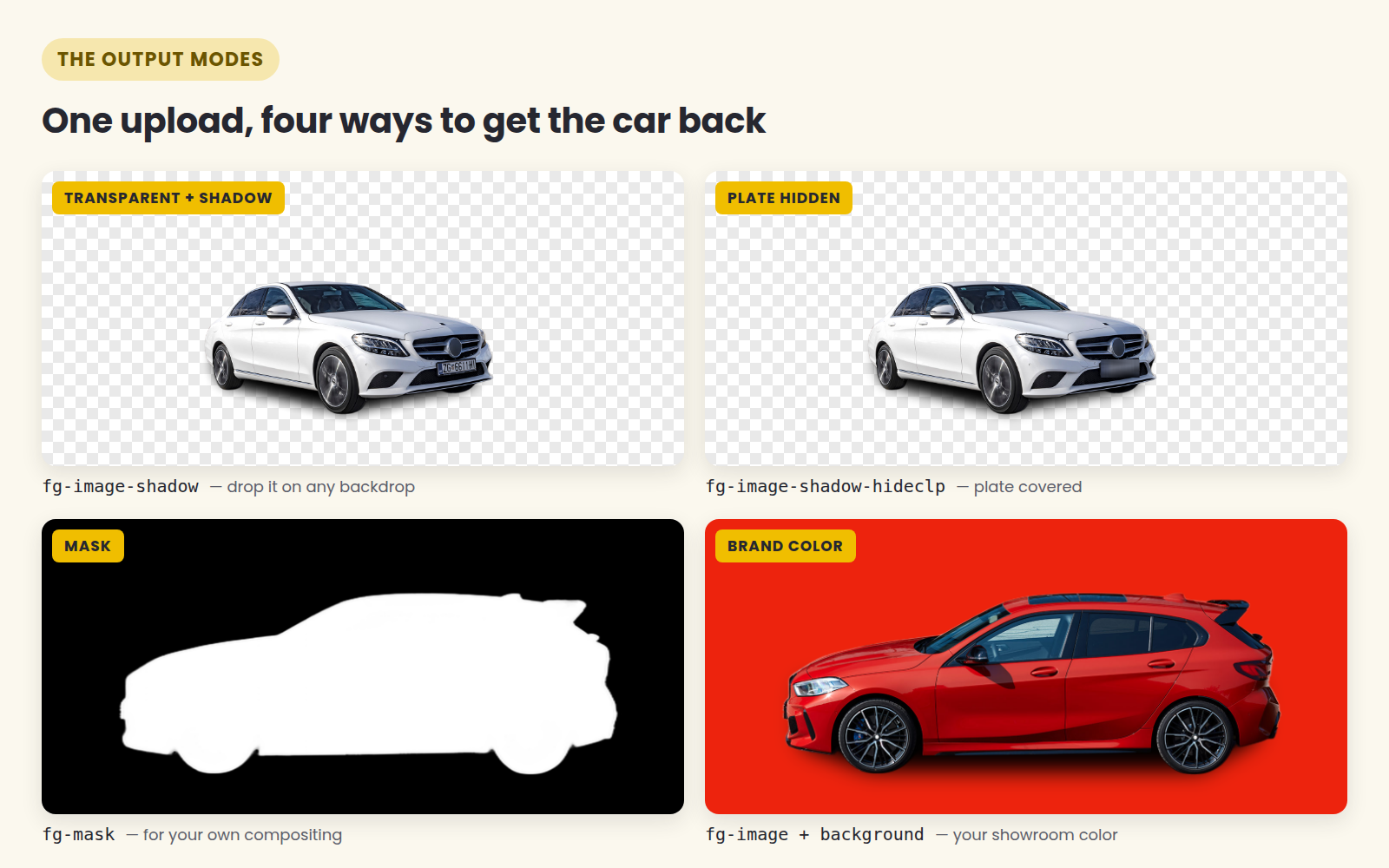
You can also pass a backdrop of your own in the image-bg field (or url-bg for a link). It's blended underneath the car and centered, and the result keeps the size of the main input image — so a 1500 × 1000 photo stays 1500 × 1000, whatever the size of the backdrop you send.
The response is JSON. The finished image comes back as base64 inside results[].entities[]:
{
  "results": [
    {
      "status": { "code": "ok", "message": "Success" },
      "name": "img.jpg",
      "width": 1024,
      "height": 768,
      "entities": [
        {
          "kind": "image",
          "name": "cars-fg-image",
          "image": "iVBORw0KGgoAAAA...YII=",
          "format": "PNG",
          "representation": "base64"
        }
      ]
    }
  ]
}
Two things to know before you write the loop. Input must be JPEG or PNG, under 16 MB, at most 4096 × 4096. And a photo the service can't process still returns HTTP 200 — with status.code set to failure and an explanation in status.message. Check that field rather than trusting the status code.
The batch script
This walks a folder of the day's photos, sends each one, and writes the finished PNG next door:
import base64
import pathlib
import requests

API_KEY = "a4a-..."                # from portal.api4.ai
URL = "https://api4ai.cloud/img-bg-removal/v1/cars/results"
MODE = "fg-image-shadow"           # or fg-image, fg-mask, fg-image-hideclp, ...

src = pathlib.Path("inbox")        # today's lot photos
dst = pathlib.Path("ready")
dst.mkdir(exist_ok=True)

for photo in sorted(src.glob("*.jpg")):
    with photo.open("rb") as f:
        response = requests.post(
            URL,
            params={"mode": MODE},
            headers={"X-API-KEY": API_KEY},
            files={"image": f},
            timeout=60,
        )
    response.raise_for_status()

    result = response.json()["results"][0]
    if result["status"]["code"] != "ok":
        print(f"skipped {photo.name}: {result['status']['message']}")
        continue

    picture = next(e for e in result["entities"] if e["kind"] == "image")
    out = dst / f"{photo.stem}.png"
    out.write_bytes(base64.b64decode(picture["image"]))
    print(f"{photo.name} -> {out.name}")
That's the whole integration. Run it from the folder your photographer drops into, point the output at whatever your feed reads, and the standardizing step disappears from everyone's day. For a few hundred cars, send several photos at once with a thread pool — each request is independent.
What it costs
CarBG is prepaid at $0.03 per processed photo, with no subscription and no seat fees, and credit that doesn't expire. New accounts start with $5 of credit, about 166 photos, and no card is required to try it.
For a store putting 250 photos a week through it, that's $7.50 a week, or about $32 a month. Compare that with the hours it replaces rather than with other software — the relevant number is how long it currently takes someone to get a day of inventory listed.
A 30-minute pilot
Take the next 20 cars exactly as you photograph them now.
Run them through carbg.api4.ai on white and again on your brand color. That's about $1.20 of credit, and the first $5 is free.
Put the results into your listing template next to last week's photos and look at the thumbnail grid, not the individual shots.
If the grid looks like one inventory, decide where it belongs: the browser tool for a single store, the API for a group.
Try it on your own photos: carbg.api4.ai — one photo, no account needed.
Automate it: Car Background Removal API docs · get a key at portal.api4.ai.