
How to Blur License Plates in Car Photos — One Photo, a Batch, or Thousands
A photo of a car is also a photo of its license plate. On a listing that's fine for a week. But public photos travel — onto aggregators, into social posts, into screenshots — and the plate goes with them long after the car has been sold.
Covering it takes a few seconds if you know which tool fits the job. This guide covers three situations: one photo, a batch of dealer listing photos, and thousands of images in a pipeline. It's about still photos. If you need to blur plates in video or dashcam footage, none of the tools below will do that.
Which route fits your job
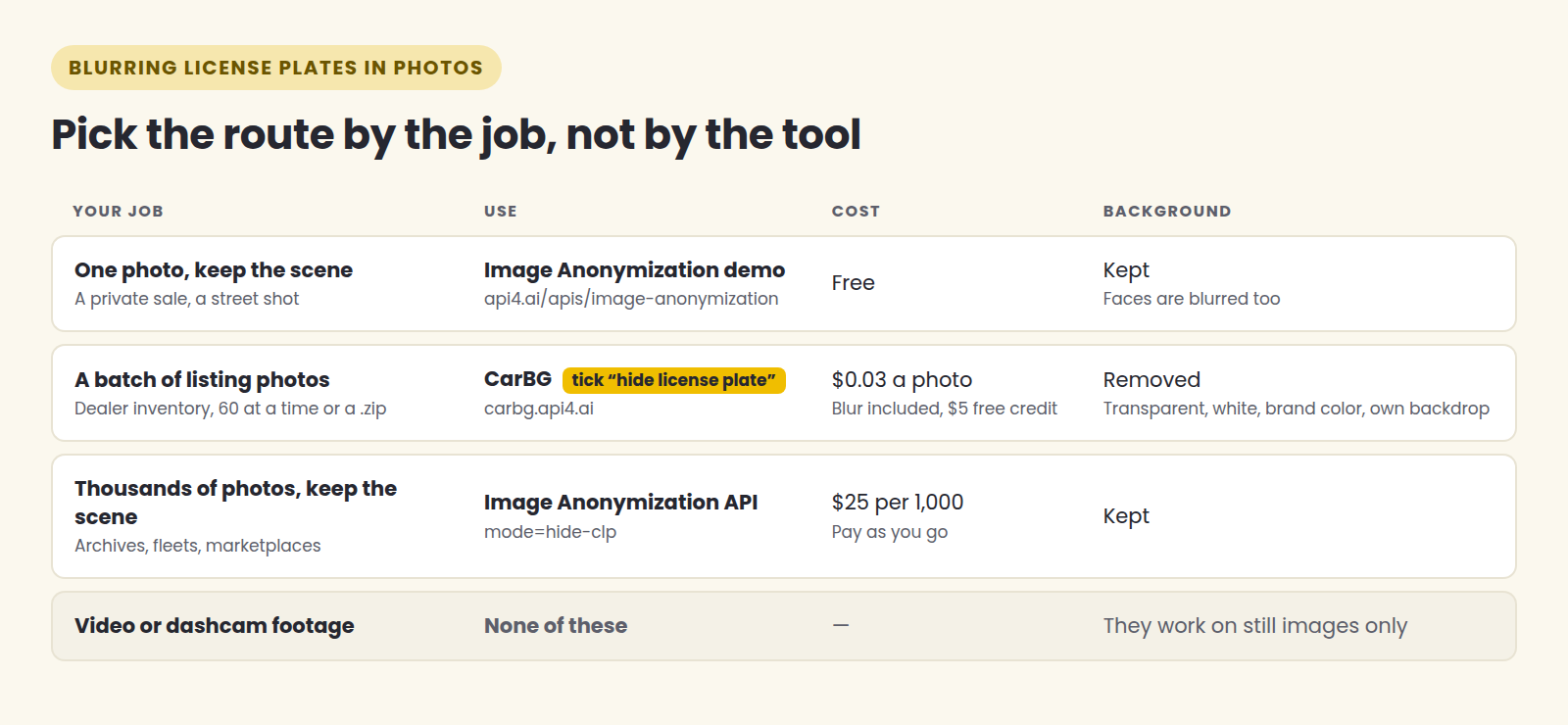
| Your job | Use | Cost | What happens to the background |
|---|---|---|---|
| One photo, keep the scene | Image Anonymization demo | Free | Kept. Faces are blurred too |
| A batch of listing photos | CarBG, with "hide license plate" ticked | $0.03 a photo, blur included | Removed — transparent, white, brand color or your own backdrop |
| Thousands of photos, keep the scene | Image Anonymization API, mode=hide-clp |
$25 per 1,000 requests | Kept |
| Video or dashcam footage | None of these | — | They work on still images only |
The one distinction that matters: do you want to keep the original scene, or replace the background? Everything else follows from that.
One photo, keeping the scene
For a private sale, a photo you're posting in a forum, or a street shot where a car happens to be in frame, you want the photo exactly as it is with the plate covered.
The Image Anonymization API page has a free demo: upload your own image, or pick one of the samples, and it finds and blurs the license plates. It blurs faces as well, which is usually what you want in a street photo anyway.
No account, no install. It's the right tool for one or two photos, and the wrong one for a lot of them.
A batch of dealer listing photos
If you're a dealer, you probably don't want the original background either: the forecourt, the neighbouring cars, the building behind. You want every car on the same clean backdrop, and the plate gone while you're at it.
That's a single job in CarBG:
Upload the day's photos — up to 60 at once, or a .zip straight off the camera card.
Tick "hide license plate" and pick a background: transparent, white, your brand color or your own backdrop. The tick applies to the whole batch, not photo by photo.
Confirm the cost and download one zip, with every plate already dealt with.
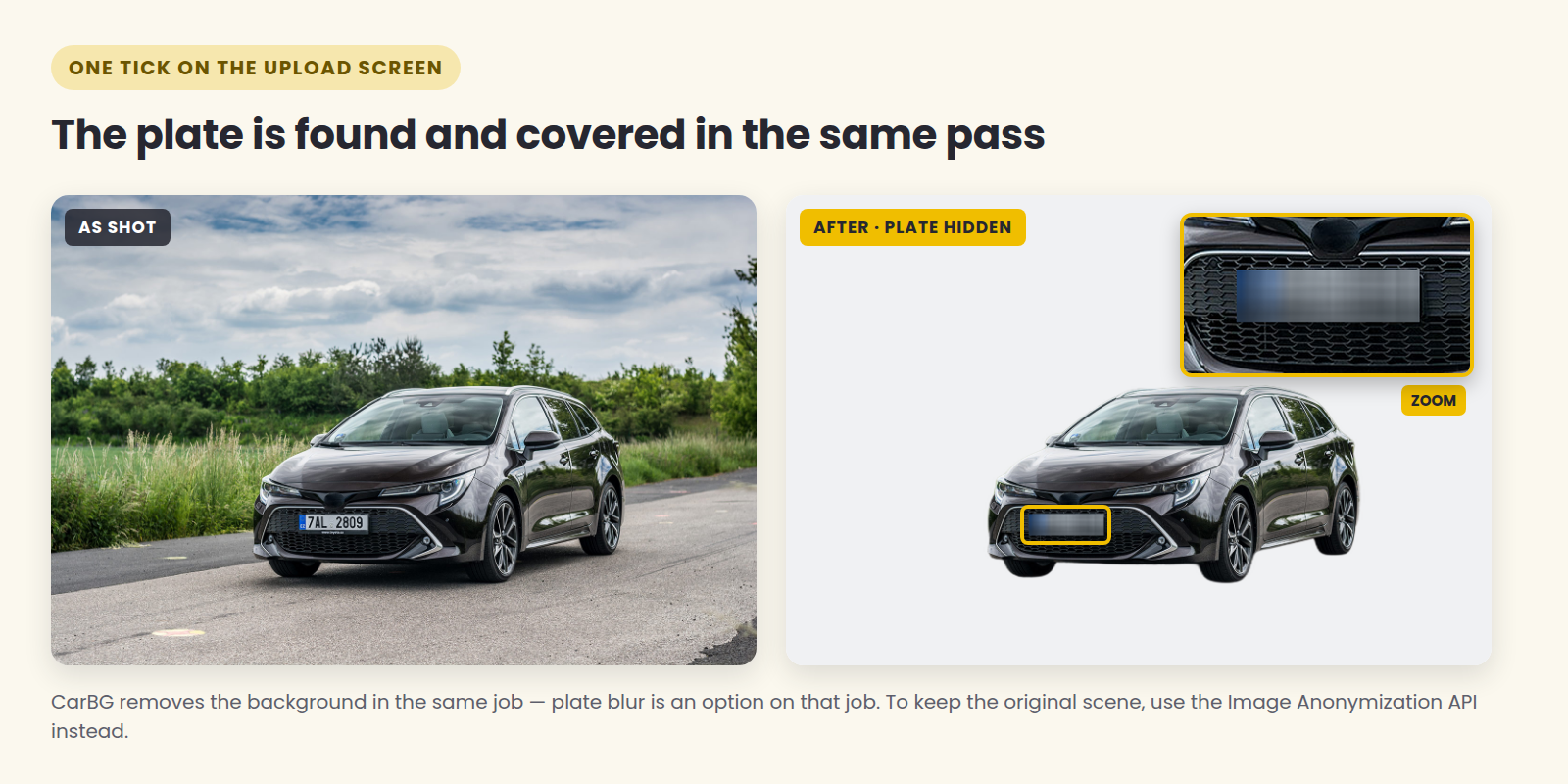
The plate is found automatically — there's nothing to draw or line up — and nothing else on the car is altered: paint, trim, badges and the reflections in the glass come back as they were.
Be clear about one thing before you start: in CarBG, plate blur is an option on a background-removal job, not a job of its own. The background is removed either way. If you want to keep the scene and only cover the plate, use the Image Anonymization route above or below.
Plate blur costs nothing extra. It's part of the $0.03 per photo, photos that fail to process aren't charged, and a new account starts with $5 of credit — about 166 photos — with no card required.
Thousands of photos, keeping the scene
For an archive, a rental fleet, a marketplace moderation queue or anything else with a lot of images and a reason to keep them intact, the same anonymization runs as an API:
POST https://api4ai.cloud/img-anonymization/v1/results?mode=hide-clpSend the photo as multipart form data (a file in image, or a public link in url) with your key in the X-API-KEY header. The response contains the anonymized image and, separately, the coordinates of every object that was hidden — useful if you need to log what was changed.
Two details worth knowing:
Without a mode, the API hides everything it supports — plates and faces. Pass mode=hide-clp to cover plates only, or repeat the parameter (mode=hide-clp&mode=hide-face) to be explicit about both.
Pricing is pay-as-you-go at $25 per 1,000 requests, through the API4AI developer portal. The full reference is in the Image Anonymization docs.
A step-by-step Python walkthrough for running a whole folder through it follows tomorrow.
When not to blur
Blurring isn't always the right call. If your inventory feeds Google's vehicle ads, the image guidelines list modified license plates among the things that are allowed but hurt performance — alongside cluttered backgrounds and dealership branding.
So for that feed, keep an unmodified set. Run the batch twice: once with the plate hidden for your own site and social posts, once without for Google. At 3 cents a photo, having both costs less than deciding.
Do you have to blur plates?
That depends on where you are and what you're publishing, and this isn't legal advice. As one reference point, the UK Information Commissioner's Office, in its guidance on number-plate recognition, says that "in most circumstances, a VRM is personal data" (VRM being the vehicle registration mark). That guidance is written for surveillance systems rather than listing photos, but it shows how regulators think about plates.
Most sellers don't blur because a rule forces them to. They do it because it removes a question — whose car was this, who owned it — from a photo that will outlive the sale. It also makes a photo reusable: the same shot can illustrate the next listing of that trim without advertising a number that belonged to a customer.
Before you publish
Whichever route you use, open a handful of results before the whole batch goes live. Check the photos where the plate sits at a steep angle, is partly covered, or is small in the frame — those are the ones worth a second look. And keep the originals somewhere private: once a plate is blurred, the published file is the only version anyone else ever needs to see.
Covering plates on a batch of listing photos: carbg.api4.ai/license-plate-blur — the first photo is free.
Keeping the scene, one photo or a million: the Image Anonymization demo and API.