The Growing Challenge of Visual Data Privacy
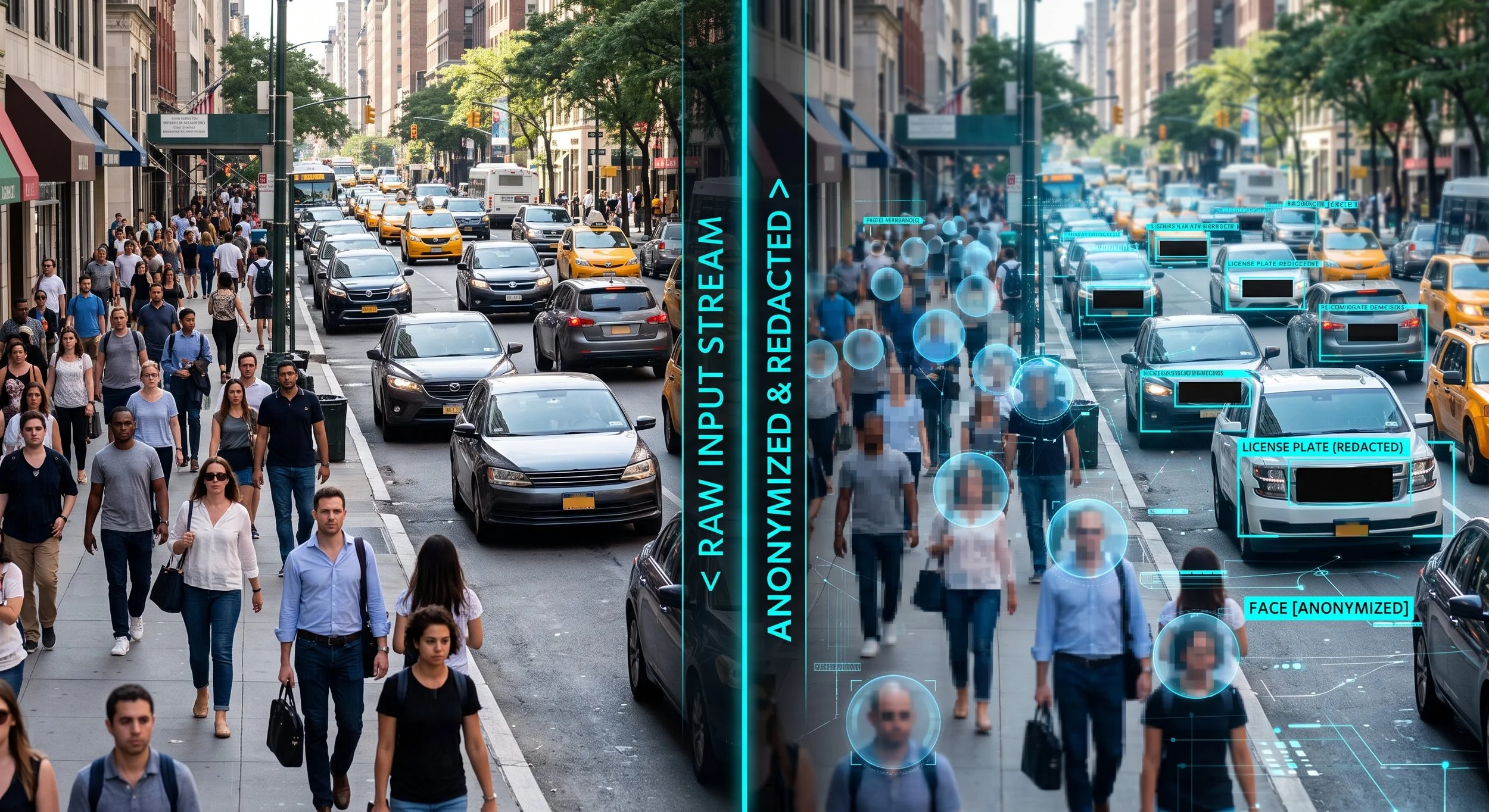
If your business handles user-generated content, street-level footage, or retail surveillance, you are sitting on a massive repository of Personally Identifiable Information (PII). Under GDPR, CCPA, and emerging global privacy laws, storing or processing unredacted faces and license plates is a direct compliance liability.
In the past, anonymizing visual data meant one of two things:
Hiring teams of human moderators to manually blur images (slow, expensive, and non-scalable).
Building and training in-house Computer Vision models (requires expensive GPU infrastructure, dedicated ML engineers, and constant edge-case maintenance).
Today, engineering teams need a frictionless way to intercept image and video streams, detect PII, and redact it instantly before it ever hits long-term storage.
In this guide, we’ll look at how to automate visual GDPR compliance using API4AI's production-ready Image Anonymization API.
Why In-House Anonymization Models Fail at Scale
Building a custom YOLO or OpenCV pipeline to detect faces and license plates sounds simple as a prototype. Taking it to production, however, introduces major engineering hurdles:
Edge Cases: Handling low-light environments, partially obscured faces, side angles, and extreme resolutions (4096×4096) without degrading performance.
Infrastructure Costs: Running continuous real-time inference requires dedicated cloud GPU clusters, which scale up cloud bills rapidly.
Pipeline Latency: Processing high-volume uploads requires thread pooling and autoscaling that take months to architect properly.
The Solution: A Serverless Anonymization Pipeline
Instead of managing machine learning infrastructure, modern backends route images through a dedicated API that returns detected bounding boxes and fully redacted images in a single call.
With API4AI's Image Anonymization API, you can redact faces, license plates, or both using a simple POST request. Here is a typical backend flow:
Ingest: Video frames or images are uploaded to your server.
Intercept: Before saving to your AWS S3 bucket or database, the payload is sent to API4AI.
Anonymize: API4AI returns the anonymized image (as well as object coordinates and confidence scores).
Store: The fully compliant, redacted image is saved to storage, and the raw original is safely discarded.
Implementation Guide in Python
To start integration, claim your API key from the API4AI Developer Portal.
API4AI supports authentication via the X-API-KEY HTTP header or query parameters. Here is a complete Python snippet to upload a local image and output the redacted result:
import base64
import requests

# 1. Production endpoint & authentication
API_KEY = 'YOUR_API4AI_API_KEY'
URL = 'https://api4ai.cloud/img-anonymization/v1/results'

headers = {
    'X-API-KEY': API_KEY
}

# 2. Upload image via multipart form-data
# Optional: Pass query params like ?mode=hide-face or ?mode=hide-clp to select specific targets.
# By default, both faces and license plates are hidden.
files = {
    'image': open('street_camera.jpg', 'rb')
}

response = requests.post(URL, headers=headers, files=files)

if response.status_code == 200:
    data = response.json()
    result = data['results'][0]

    # Extract anonymized image (returned as base64 string)
    anonymized_b64 = result['entities'][0]['image']
    with open('street_camera_anonymized.jpg', 'wb') as f:
        f.write(base64.b64decode(anonymized_b64))

    print(f"Success! Detected {len(result['entities'][0]['objects'])} sensitive objects.")
else:
    print(f"Error {response.status_code}: {response.text}")
Note: You can also pass remote public image URLs directly using the url form parameter instead of binary file uploads. Full parameter definitions are listed in the API4AI Image Anonymization Documentation.
Key Use Cases for Automated Anonymization
Mapping & Telematics: Automatically blur pedestrians and vehicle registration numbers in dashcam feeds before crowdsourcing mapping datasets.
Retail Analytics: Analyze foot traffic and shopper patterns without storing recognizable face data.
User-Generated Content: Sanitize photos uploaded to marketplaces or social platforms before public display.
Healthcare & Research: Strip identifiable personal features from clinical or behavioral study media.
🛠️ Ready to build?
Stop re-inventing machine learning pipelines.
Create a free account at portal.api4.ai (no credit card required).
Generate your API key in seconds.
Review the detailed technical specs in the official Image Anonymization Documentation and start integrating.