
If you run a listing site, a dealer website platform or an agency that handles photos for many dealers, you get car photos you didn't take. They arrive from phones, from lot cameras and from feeds, shot in front of fences, other cars and car wash signs. Your buyers see a page of them side by side.
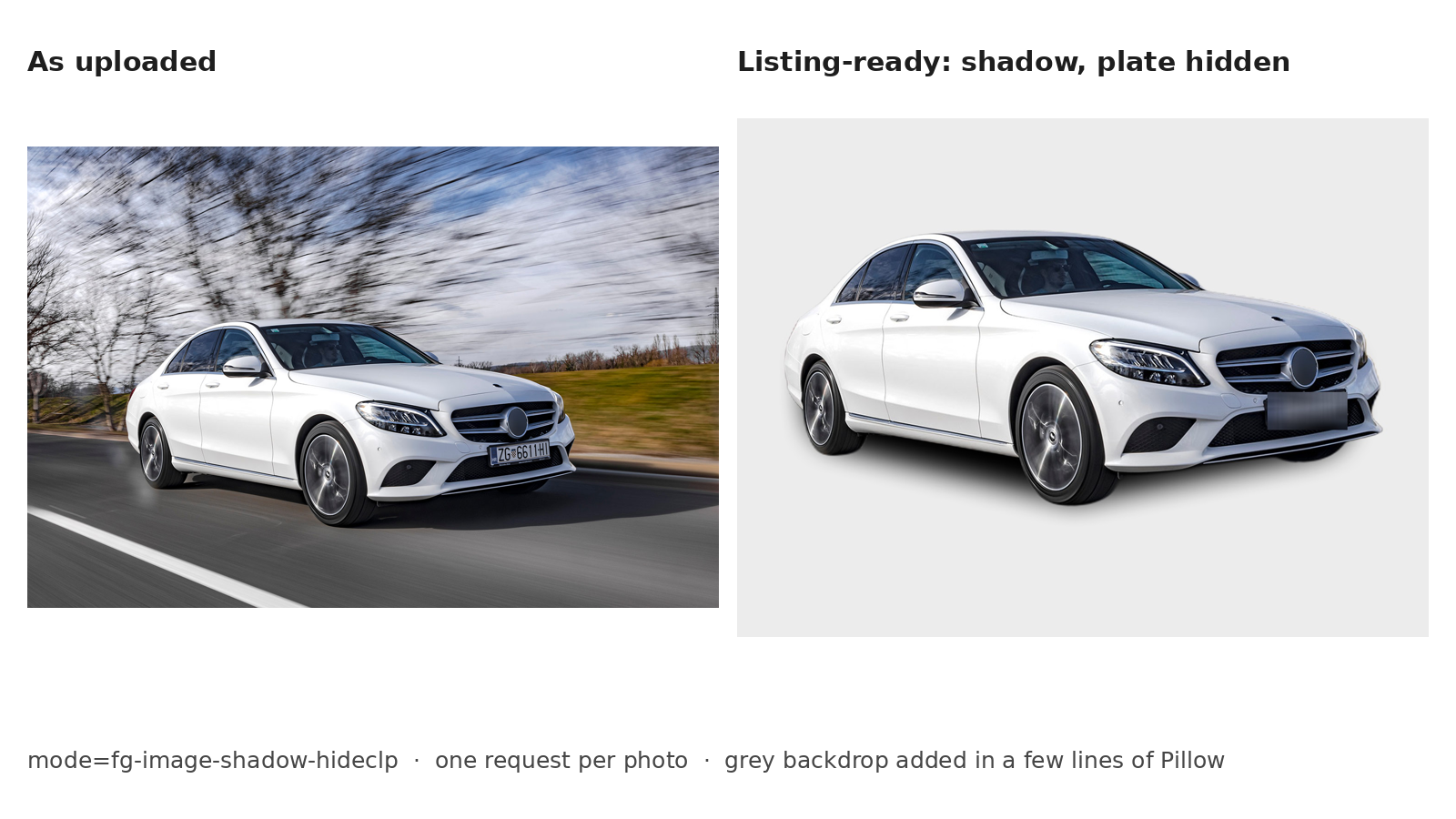
The fix most sites want is the one dealers already pay photographers for: every car on the same clean background. Done at upload, that's one HTTP request per photo. This guide shows what the request looks like, the options that matter for listings, and what to check before you switch it on for every dealer.
What the request looks like
POST https://api4ai.cloud/img-bg-removal/v1/cars/results?mode=fg-image-shadow-hideclp
X-API-KEY: <your key>
The body is multipart form data: the photo as a file in image, or a public link in url. A link is handy when the photos already sit in your storage or a dealer's feed:
curl -X POST "https://api4ai.cloud/img-bg-removal/v1/cars/results?mode=fg-image-shadow" \
  -H "X-API-KEY: $API4AI_KEY" \
  -F "url=https://static.api4.ai/samples/img-bg-removal-cars-2.jpg"
The answer is JSON. The cut-out car comes back as a base64 PNG with a transparent background, the same size as the photo you sent:
{
  "results": [{
    "status": { "code": "ok", "message": "Success" },
    "width": 1500, "height": 1000,
    "entities": [{ "kind": "image", "format": "PNG", "representation": "base64", "image": "iVBORw0KGgo..." }]
  }]
}
The options that matter for listings
The mode parameter decides what you get back:
mode |
What you get |
|---|---|
fg-image |
The car on a transparent background |
fg-image-shadow |
The same, with a soft shadow under the car |
fg-image-hideclp |
The car with its license plate hidden |
fg-image-shadow-hideclp |
Shadow and hidden plate |
fg-mask |
A mask only, if you composite the image yourself |
GET https://api4ai.cloud/img-bg-removal/v1/modes returns the current list, so your code doesn't have to hard-code it.
The shadow. A cut-out car without one looks like it's floating. For listing pages, use a shadow mode.
The plate. Many sellers would rather not publish their plate. Hiding it is a mode, not a second service or a second charge. Keep one exception in mind: if a dealer's photos also feed Google's vehicle ads, Google lists modified license plates among the things that are allowed but may hurt performance. For that feed, run the plain mode.
The backdrop. You get a transparent PNG, so the backdrop is yours: white, light grey, the dealer's brand color or a showroom image, placed in your own image pipeline. Light grey is kinder to white and silver cars than pure white.
What it costs
The Car Background Removal API is $30 per 1,000 images, pay as you go on the API4AI developer portal, with no subscription and no monthly minimum. A new account gets $5 of credit, about 166 car photos, to test on your own photos, and your balance never expires. If you expect more than about 15,000 photos a month, ask us for a volume price.
It's a separate API from our general background removal, tuned for car photos, which is why it's priced on its own. If you have both product photos and cars, one balance pays for both.
Where to put it in your flow
At upload. Process the photo when the dealer uploads it, store both the original and the result, and show the result by default. Keep the original: some buyers want to see the car where it really stands, and you may want it for another channel.
In the feed import. If dealers send a feed of image URLs, process new URLs as they appear and skip the ones you've done. Our step-by-step tutorial does this in Python for a CSV feed, with retries.
For the dealers themselves. Smaller dealers without a developer can use the same engine in the browser at CarBG, with the same login and balance.
What to check before you switch it on for everyone
Background removal is automatic. A page full of listings still deserves a look before it goes live.
Failures come back as HTTP 200. A photo the service can't load or process returns "status": {"code": "failure"} with a message, inside a normal 200 response. Check status.code on every result, not just the HTTP status, or you'll store empty images.
Windows. Glass is see-through, so the old background can still show through the side and rear windows after it has been replaced. It's hard to notice on many three-quarter shots; on side-on shots against a busy background, look twice. This is the weak spot to know about today.
Open doors, tailgates and convertibles. The more of the scene you can see through the car, the more there is to check.
Exterior shots only. Interiors, engine bays and odometer close-ups have no background to replace; send them through unchanged.
Cropped cars. A bumper cut off by the frame stays cut off. Google's vehicle ads, for example, disapprove truncated images of the vehicle.
Logos and text on your backdrop. Fine on your own site; for Google's vehicle ads, superimposed logos and text are not allowed.
A practical start: run one dealer's last 100 photos, look at all of them, and only then turn it on for new uploads.
The short version
One request per photo: POST /img-bg-removal/v1/cars/results with the photo or its URL.
Pick the mode: shadow for listing pages, hidden plate if your sellers want it, plain for Google's vehicle ads.
$30 per 1,000, pay as you go, $5 free to start, volume pricing on request.
Check status.code on every result, and look at side-on shots for the old background through the windows.
Try it on your own photos: the demo is on the Car Background Removal API page, and a key with $5 of free credit is on the developer portal.
FAQ
How do I remove the background from car photos with an API?
Send each photo, or its URL, to POST https://api4ai.cloud/img-bg-removal/v1/cars/results with your key in X-API-KEY. You get the car back as a transparent PNG.
Can it add a shadow and hide the license plate?
Yes, with the mode parameter: fg-image-shadow, fg-image-hideclp, or both with fg-image-shadow-hideclp.
What does it cost?
$30 per 1,000 images, pay as you go, with $5 of free credit for a new account. Volume pricing is on request.
Does it work on interior photos?
No. It's for exterior shots; interiors have no background to replace.