
Sellers photograph products where they are: on a kitchen table, on a bedspread, in one hand. If your marketplace or shop platform takes those photos as they come, the catalog looks like a hundred different kitchens. Cutting the product out at upload and putting it on a plain background is the obvious fix, and an API can do it for every photo, at the moment it arrives.
The catch is in "every photo". An automatic step also runs on the photos it shouldn't publish without a look. This guide covers where an automatic cut-out fits in a seller upload flow, where it doesn't, and the few checks that keep the bad ones off your listing pages.
Where it fits
The main image on category and search pages. This is the one photo that sits in a grid next to everyone else's, so it's where a consistent background matters most. Marketplaces set rules for it. Google's product image rules ask for at least 500×500 pixels (1500×1500 or more recommended) and rule out borders, promotional overlays and watermarks. eBay asks for at least 500 pixels on the longest side and rules out added borders, text and watermarks. A cut-out on a plain background, centred with a margin, is a good default for that slot.
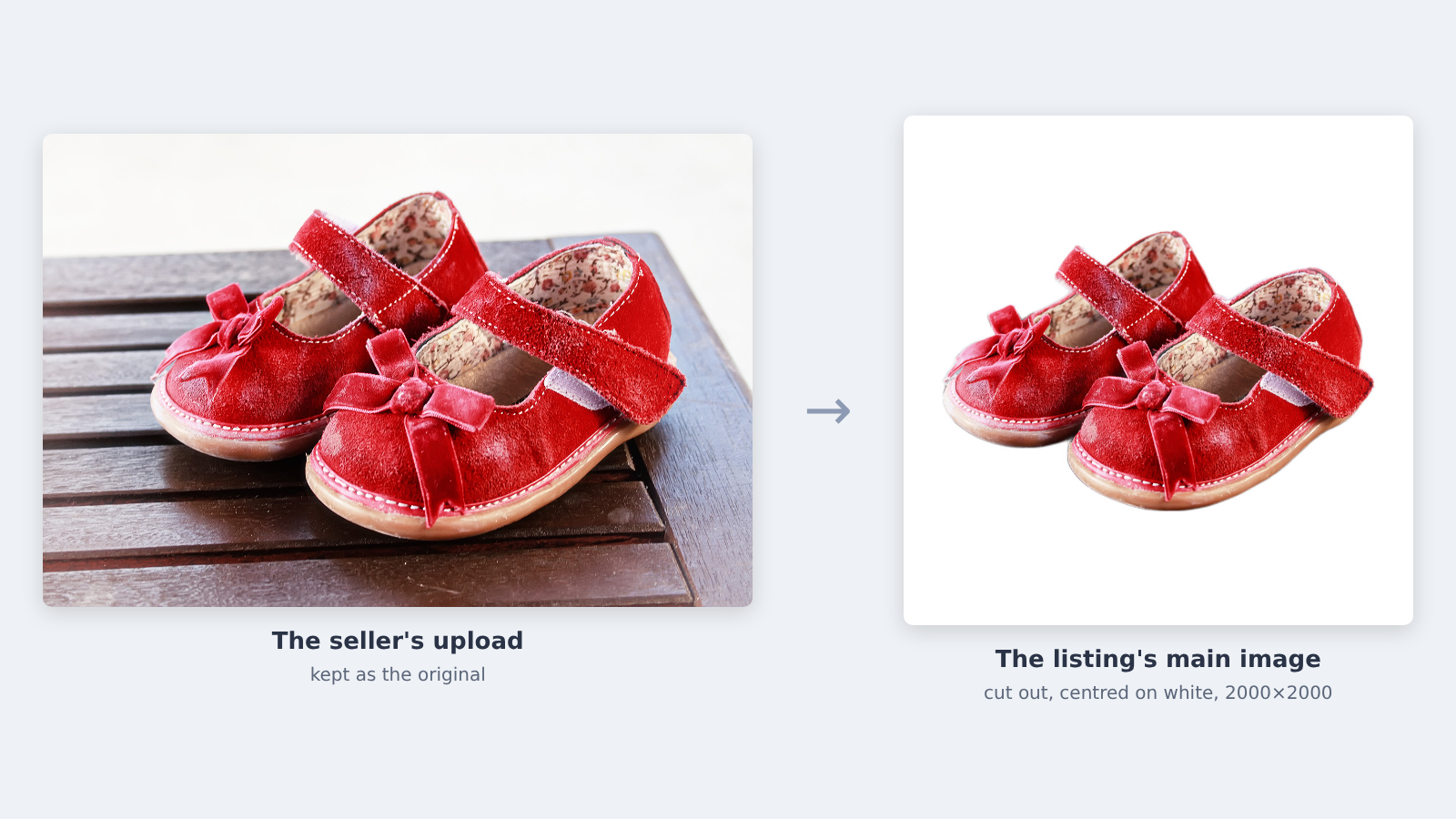
Platforms that resize and crop automatically. Square thumbnails, 4:5 mobile cards, a zoom view: once the product is cut out and trimmed, you can place it the same way in every format instead of hoping the seller framed it well.
Feeds you pass on. If your listings go on to shopping ads or a partner marketplace, a clean main image is one less reason for them to be rejected there.
Where it doesn't
The other photos. Detail shots, the product in use, the label, the size next to a hand. Those are supposed to have context. Cut out the main image only, unless a seller asks for more.
Used and second-hand items. The photo is evidence of condition. eBay's policy says photos must accurately represent the item, and a cut-out can hide a scuff on the edge or the stand it came with. Keep the original visible for these.
Products that are their surroundings. Wallpaper, rugs laid on a floor, a garden set in a garden. There's nothing to cut out.
Several items in one photo. A bundle or a lot of five gets all five cut out. That's fine. A model holding the product and a coffee gets the coffee cut out too, and only the seller knows which one is for sale.
How to wire it in
The safest shape is simple: keep the original, publish the cut-out only when it passed, and send everything else to a person.
Save the seller's original before anything else. It's the fallback, the evidence, and what you re-run when you change settings.
Call the API with the uploaded file. The Background Removal API takes a JPEG or PNG under 16 MB and returns a PNG with a transparent background (or a black-and-white mask, if you'd rather apply it yourself).
Check the result with the cheap tests below. They run in milliseconds on the returned PNG.
Build the listing image: trim the transparent edges, scale the product to fill most of a square, centre it on white.
Publish the listing image if the checks passed. If they didn't, publish the original and put the photo on a review list. The seller never waits on a person.
If uploads come in bursts, do steps 2 to 5 in a background job and show the original until the cut-out is ready. The listing goes live straight away either way.
What to check before it goes live
Nobody will look at every cut-out. Let them flag themselves:
Almost nothing kept. The model didn't find a product, or the photo is of a box, a label or a screenshot. Under a few percent of the frame is a good alarm.
Almost nothing removed. Either the product fills the whole frame or the background was kept.
The product touches the frame. The seller cropped it, or part of the table survived.
A lot of see-through pixels. Soft edges are normal on suede, fur and hair. Many of them usually means glass, clear plastic, lace or a blurry photo. These are the products where a cut-out is most likely to look wrong on white.
The service said no. This one is easy to miss: when our service can't process a photo, for example a file that isn't really an image, it still answers HTTP 200, and the JSON says "failure" with the reason. Code that checks only the HTTP status treats that as a success with no picture. Check the status in the response body.
Set the thresholds on a day of your own uploads, not on ours. On our three demo photos (shoes, a car, a person), between 2% and 4% of the kept pixels were clearly see-through; a lace dress or a perfume bottle will be well above that, and that's the point of the check.
What it costs
Background Removal is $5 per 1,000 images, pay as you go with no subscription. At 10,000 seller uploads a month, the API part is $50. The part that decides your real cost is the review list: how many photos get flagged, and how long each takes a person. Count both in your first week before you plan on a number.
For people and cars there are separate APIs tuned for those photos ($15 and $30 per 1,000), and volume pricing on request from about 15,000 images a month.
If your platform calls remove.bg today
remove.bg's self-serve API ends on December 1, 2026: background removal moves to Leonardo.Ai, a different API. If your upload hook calls remove.bg, it needs a new provider in the next three weeks. Our page Moving from the remove.bg API shows the code change in cURL, Python and Node, with a dated price table.
Where to start
Try your sellers' worst photos in the demo on the Background Removal page: the glass bottle, the white shirt on a white sheet, the product held in a hand.
Get a key on the API4AI developer portal. No credit card; new accounts get $5 of free credit, and your balance never expires.
Wire it in behind the original, as above. The step-by-step Node.js tutorial has the upload hook, the checks and the fallback in about 130 lines.
For more on running background removal at volume, see Background removal at 500+ images a day and Scaling product catalog onboarding with automated background removal.
FAQ
-
You can, but it's usually best for the main image only. Detail and in-use photos need their context, and for used items the original photo is the evidence of condition.
-
It answers HTTP 200 with a "failure" status and a reason in the JSON. Keep the seller's original on the listing and put the photo on a review list.
-
Not on its own. Rules also cover size, borders, text and watermarks, and a cut-out doesn't remove text a seller added to the photo. Check each marketplace's current rules.
-
$5 per 1,000 images for products and general objects, pay as you go. New accounts get $5 of free credit, and volume pricing is available on request.